ElectionChamp
Introduction
Your voter list is the backbone of your election. If a voter’s email is misspelled, they won’t receive their voting link. If someone is missing from the list, they can’t vote. If someone is on the list who shouldn’t be, your election’s legitimacy is at risk.
Getting the voter list right isn’t glamorous work, but it’s the single biggest factor in whether your election runs smoothly or becomes a logistical headache. This guide covers everything from preparing your data to handling issues during a live election.
Preparing Your Voter List
Before uploading anything, your voter list needs to be clean and properly formatted.
Required Fields
What columns you need depends on your notification method:
- Email Notification: You need at minimum a Name column and an Email column.
- SMS Notification: You need a Name column and a Phone column (with country code).
- Manual Notification: You only need a Name or identifier column. No contact info required — you’ll distribute keys yourself.
Data Cleaning Checklist
- Remove duplicate entries (same person listed twice)
- Verify email formats (look for missing @ signs, typos like “gmail.con”)
- Standardize phone number formats if using SMS
- Remove any voters who are no longer eligible
- Ensure names are spelled correctly (these may appear in the voter label field)
- Check for blank rows or columns in your spreadsheet
Importing Your Voter List
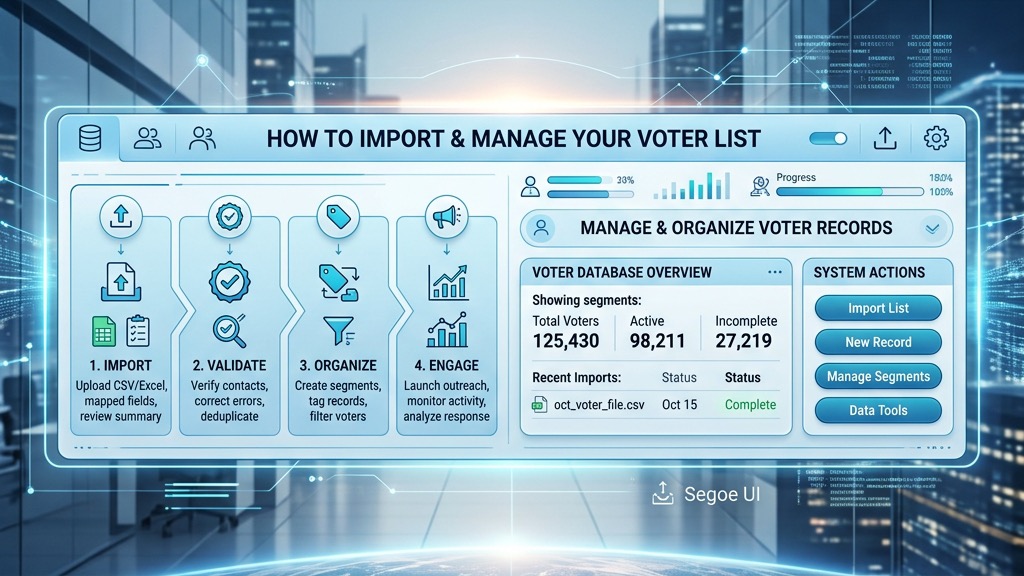
CSV or Excel Upload: Click the upload area on the Voter List step. ElectionChamp accepts both CSV and Excel (.xlsx) files. The system will attempt to auto-map your columns. Verify that the mapping is correct before proceeding.
Manual Entry: For elections with fewer than 20–30 voters, you can enter voters directly into the interactive grid. Click on a cell and type. This is often faster than preparing a spreadsheet for very small elections.
Extra Keys: Your Safety Net
Always add 5–10 extra keys when setting up your election. These are blank, unassigned voter slots that serve as your safety net.
Why they matter:
- A new member joins after the election is launched
- You discover a missing voter who was accidentally left off the list
- Someone’s key is compromised and you need to issue a replacement
Extra keys count toward your total voter count for pricing, but the small cost is worth the flexibility. You cannot add voters to a live election without pre-created extra keys.
Managing Your Voter List During a Live Election
Once the election is launched, you can’t add or remove voters from the list (this preserves election integrity). But you can:
- Resend Notifications: Go to the Voters tab, find the voter, and click Resend. This sends the same key again — it does NOT create a new key.
- Check Delivery Status: The Election Status panel shows real-time email delivery status (Pending → Sending → Sent). You can also check individual voter statuses in the Voters tab.
- Identify Issues: If a voter reports they haven’t received their email, check if it bounced. Common causes: misspelled email address, full mailbox, corporate email filters blocking the domain.
Troubleshooting Common Voter List Issues
“My voter didn’t receive their email”
- Check their Spam/Junk folder — this is the #1 cause.
- Verify the email address is spelled correctly in the voter list.
- Ask if their IT department has blocked the ElectionChamp domain.
- Resend the notification from the Voters tab on your dashboard.
“I need to add a voter after the election launched”
Use one of your extra keys. Assign the extra key to the new voter and distribute their voting link manually (or resend the notification if you have their email on file).
“A voter accidentally shared their key”
If the key hasn’t been used yet, there’s no security risk — only the person with the key can vote. If the key has been used by the wrong person, contact support to discuss options.
Ready to run your first election? Start for free at ElectionChamp.com — no credit card required for up to 20 voters. All features included on every plan.