ElectionChamp
Introduction
Ranked choice voting (RCV) is growing in popularity across organizations of all types. It produces outcomes that better reflect the collective will of voters, reduces the spoiler effect, and encourages candidates to build broad coalitions rather than just mobilizing a narrow base.
But for many election administrators, RCV feels complicated. How do you set it up? How do voters rank their choices? How is the winner actually determined? And how do you explain the results to members who are used to “most votes wins”?
This guide answers all of those questions with a practical, step-by-step approach.
What Is Ranked Choice Voting?
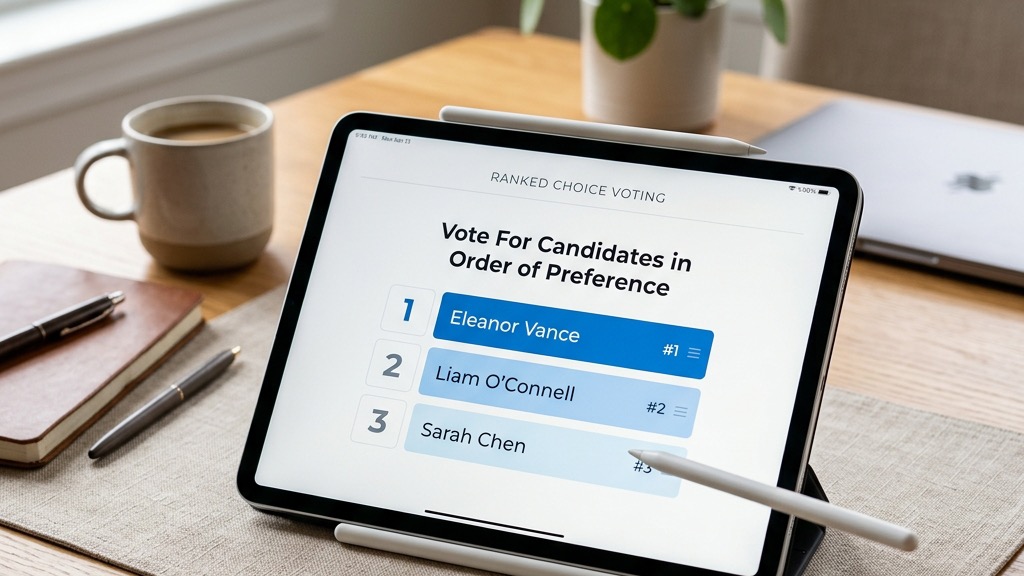
In a ranked choice election, instead of selecting a single candidate, voters rank all candidates in order of preference: 1st choice, 2nd choice, 3rd choice, and so on.
ElectionChamp uses the Borda Count method to tally ranked choice ballots. Here’s how it works:
- Each ranking position is assigned a point value. With 5 candidates, a 1st-place ranking earns 5 points, 2nd place earns 4 points, 3rd place earns 3 points, and so on down to 1 point for last place.
- Every voter’s rankings are converted to points, and the points are summed across all voters.
- The candidate with the highest total points wins.
This method rewards candidates who are consistently ranked highly by many voters, not just those who are the first choice of a narrow group.
When to Use Ranked Choice Voting
RCV is ideal when:
- You want the winner to have broad consensus, not just a plurality
- There are 3 or more candidates and you want to avoid splitting votes between similar candidates
- You’re selecting a keynote speaker, award recipient, or priority from multiple options
- Your bylaws or governance standards emphasize majority or consensus-based outcomes
RCV may not be necessary when there are only 2 candidates (Plurality works fine) or when you’re running a simple Yes/No vote.
Setting Up RCV on ElectionChamp: Step by Step
- Create a New Election and complete Phase 1 (Election Details) and Phase 2 (Security Settings) as normal.
- In Phase 3 (Ballot Builder), click “Add Ballot Question.”
- Select “Ranked Choice” as the Voting Method.
- Enter the Position Title (e.g., “Board Chair — 2026–2028 Term”).
- Write Voter Instructions. This is critical for RCV. Example: “Rank the candidates below in order of preference. Drag or number each candidate from 1 (most preferred) to 4 (least preferred). Your 1st choice receives the most points.”
- Add Your Candidates with photos and biographies as desired.
- Configure Advanced Settings: Set Total Winners (usually 1 for RCV), enable Random Order to prevent position bias, and optionally enable Allow Abstain.
- Preview the Ballot to see the drag-and-drop ranking interface voters will use.
Explaining RCV Results to Your Members
The most common objection to ranked choice voting is “I don’t understand the results.” Here’s how to address this proactively:
Before the election: Include a brief explanation in your pre-election communication: “This election uses ranked choice voting. Instead of selecting one candidate, you’ll rank them in order of preference. The candidate with the broadest support across all rankings wins.”
After the election: When sharing results, show both the total Borda points for each candidate and a simple statement: “[Winner Name] received the highest combined ranking from all voters, reflecting the broadest support across the membership.”
ElectionChamp’s results display includes the full point breakdown, so members can see exactly how each candidate was ranked.
Common Mistakes to Avoid
- Not explaining the method to voters beforehand. If voters don’t understand they need to rank all candidates, they may only rank their top choice, which weakens the consensus-building benefit of RCV.
- Using RCV when Plurality would suffice. For simple elections with 2 candidates or straightforward Yes/No votes, Plurality is simpler and equally effective.
- Forgetting to enable Random Order. Position bias is even more impactful in ranked choice ballots. Always shuffle candidate order.
Ready to run your first election? Start for free at ElectionChamp.com — no credit card required for up to 20 voters. All features included on every plan.