ElectionChamp
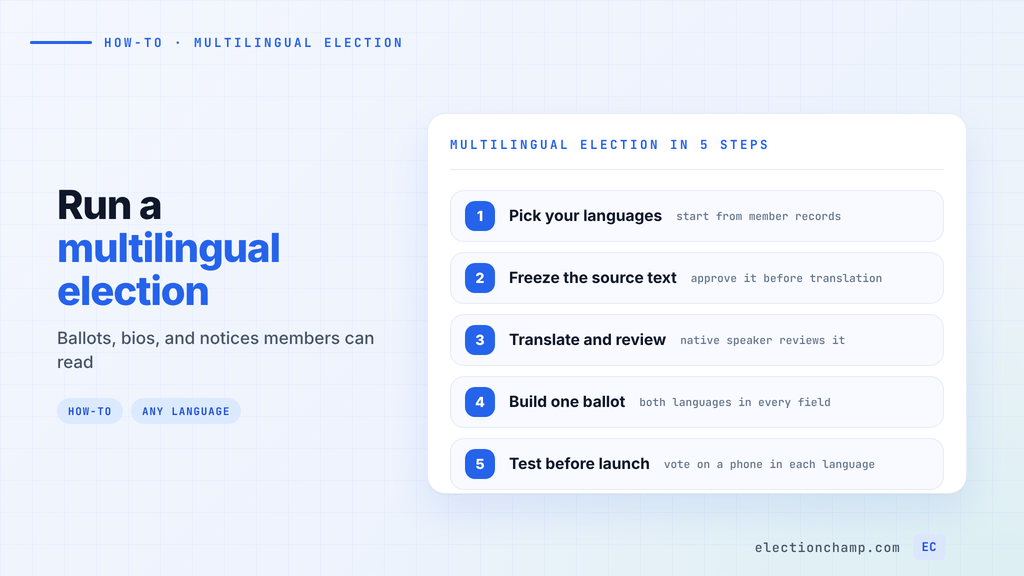
Short answer: To run a multilingual election, pick languages from your member records and approve the source text. Have a qualified translator translate it and a native speaker from your membership check it. Put both languages in each ballot field so every member votes on one ballot. Send bilingual notices, test the ballot on a phone in each language, and state which version controls if wording differs.
This multilingual election guide is for HOAs, unions, associations, and community groups whose members read in more than one language.
When You Need a Multilingual Election
Start with data you already have. Check member records for a preferred language field, past requests for translated notices, and how meetings run today. If your annual meeting already uses an interpreter, your ballot probably needs a second language too.
For private organizations, the duty usually comes from your own governing documents and your members. Check your bylaws for rules on the language of notices and ballots, and confirm with counsel before treating translation as optional.
Two public references are worth knowing:
- Unions. The U.S. Department of Labor’s guide for conducting local union officer elections suggests that if “a substantial number” of members are non-English speaking, the election notice should include a translation of the required information.
- Public elections. Section 203 of the Voting Rights Act requires covered jurisdictions to provide ballots and voting materials in the language of the applicable minority group, according to the Department of Justice summary. It applies only to public elections. Its scope is still a useful model: notices, forms, instructions, and ballots.
Keep the list of languages short enough to translate well. Two carefully checked languages serve members better than five rushed ones.
How to Translate a Ballot Without Changing Its Meaning
Translation errors on a ballot can change what a member thinks they are voting for. Treat translation as part of the election timeline, with its own deadline.
- Freeze the source text. Approve the ballot questions, motions, and instructions in your primary language first. Every edit after translation starts means a second round of translation.
- Build a short glossary. List the terms that repeat: board, director, motion, abstain, quorum, ballot, term. Agree on one translation for each and use it everywhere. The U.S. Election Assistance Commission publishes glossaries of election terminology in 19 languages, which make a good starting point.
- Use a qualified translator. Professional translators, bilingual staff, and community organizations close to your members are all reasonable choices.
- Have a native speaker review it. Pick someone from your own membership, who knows the dialect your members actually use.
- Read motions back. For yes or no motions, ask the reviewer to explain in their own words what a “yes” vote does. If their answer differs from the original, fix the translation.
The Fair Elections Center’s guide to language access in elections warns that automated tools “often leave selected words untranslated, and use phrasing that is unnatural or not easily understood by native speakers.” A machine draft can save time, but a person must check every line.
Decide in advance which version controls if the wording differs. Put that sentence in the election notice and in the ballot instructions. Confirm the choice with your bylaws and counsel.
Multi-Language Ballot Layout: One Ballot or Separate Versions
You have a few ways to set up a multi-language ballot. For most organizations, one bilingual ballot is the cleanest option.
| Approach | How it works | Trade-off |
|---|---|---|
| One bilingual ballot | Each question, option, and instruction shows both languages | One result, one voter list; text gets longer |
| Separate election per language | Each language group gets its own ballot | Results must be combined by hand, which invites disputes |
| Primary ballot plus translated guide | Ballot in 1 or 2 languages, a linked document in others | Works for many languages; voters switch between two screens |
On a bilingual ballot, keep the order the same in every field. Put the primary language first, then the translation on the next line. The Center for Civic Design recommends that bilingual voter guides keep the layout consistent and signal which languages are available near the top.
In ElectionChamp, ballots and notifications can be written in any language, so you type or paste both versions into each field. The voter instructions field is a good place for the language note and the “which version controls” sentence. Our page on multi-language ballots shows the setup. For general layout advice, see how to design an election ballot.
Do not translate candidate names. Write each name the way the candidate writes it. If a name uses a different script, ask the candidate how to show it in both.
Candidate Bios and Statements in Multiple Languages
Bios are where fairness questions come up. A clear, warm translation for one candidate and a stiff one for another can look like favoritism.
- Set one word limit for every candidate, applied to the source text.
- Use the same translator for all candidates in a race.
- Send each candidate their translated bio to approve before launch, with a firm deadline.
- Translate each statement as written. Do not let the translator soften or improve it.
Turn on random candidate order if your bylaws allow it, so no candidate always appears first.
Bilingual Voting Notifications by Email and SMS
The invitation is the first thing members see, so it needs both languages before the ballot link.
For email, open with a one-line language note in each language, then the full message in the primary language, then the translation. Put the ballot link in both sections. ElectionChamp email templates support Markdown, so you can use headings to separate the languages, and the Insert chips add labels like [Voting link] and [Election name] to each part. Our guide to writing election notifications that get opened covers subject lines.
Write dates as words, such as “November 13, 2026,” in each language. A date like 11/12 reads as November 12 in the U.S. and December 11 in many other countries. Name the time zone every time.
SMS needs more care. Twilio’s documentation on UCS-2 encoding explains that one character outside the basic GSM-7 set switches the whole message to UCS-2. Each segment of a multi-part message then drops from 153 characters to 67. Accented letters and non-Latin scripts can trigger this. Keep bilingual texts short, with the deadline and the link in each language.
Reminders should follow the same bilingual format. Free elections include 1 reminder and paid elections include up to 5.
Quality Checks Before You Launch
In ElectionChamp, the ballot and voter list lock at launch. Find translation problems during setup, when they are free to fix. Run a test election and ask a native speaker of each language to vote on their own phone.
- Every question, option, and instruction appears in each language, in the same order.
- Selection rules match in both versions, such as “select up to 3.”
- Numbers, dates, deadlines, and term lengths match across languages.
- Glossary terms are used consistently on the ballot, in bios, and in notices.
- The ballot link works in each section of the email and in the SMS.
- Long translations still read well on a small screen.
- The “which version controls” sentence appears in the notice and the instructions.
After the election, ask a few members from each language group whether anything was unclear. Fix the glossary before your next vote.
Accessibility for Multilingual Voters
Language access and disability access overlap. A member who uses a screen reader needs the translated text to be read with the right pronunciation.
WCAG Success Criterion 3.1.2, Language of Parts, asks that passages in a different language be marked so “screen readers can use the pronunciation rules of the language of the text.” Apply this to anything you publish yourself, such as candidate guides on your website and PDF notices.
- Write short sentences in plain words in every language. Simple text translates more accurately.
- Give a help contact who speaks each language, with an email or phone number in the notice.
- Offer assisted or in-person voting for members who need it. In a hybrid election, printed voter keys let those members vote with help, tracked alongside online votes.
For in-person options, see our guide to running a hybrid election.
Frequently Asked Questions
Can you run one election in multiple languages?
Yes. The simplest method is one bilingual ballot where every question, candidate option, and instruction appears in each language. All members vote on the same ballot, so you get one set of results and one voter list.
Is Google Translate good enough for election ballots?
Use it only as a first draft. Machine translation can leave words untranslated or use unnatural phrasing. Have a qualified translator and a native speaker from your membership check every line, especially motions.
Which language version is official on a bilingual ballot?
Your organization decides, within its bylaws. Most groups name the primary language as the controlling version. State it in the election notice and the ballot instructions, and confirm the approach with your bylaws and counsel.
How do you send bilingual voting notifications by SMS?
Keep the text short: a greeting in each language, the deadline, and the ballot link. Accented letters and non-Latin scripts can switch a text to UCS-2 encoding, which cuts each segment of a long message to 67 characters.
Planning your next vote? Read about multi-language ballots and association voting software, or see pricing: free up to 20 voters, $10 up to 200, then $0.05 per voter.