ElectionChamp
Short answer: When a candidate withdrawal hits an election after ballots go out, you usually have two options. Keep the election running and tell voters the candidate has withdrawn, or close it and rerun it with a corrected ballot. Your bylaws decide which is allowed and what happens if the withdrawn candidate wins. Announce the change quickly, keep the message neutral, and record every decision in writing.
This guide covers the emergencies committees actually face. For each one: the first step, what bylaws usually address, and what an online platform can and cannot do once voting starts.
What to Do If a Candidate Withdraws After Ballots Go Out
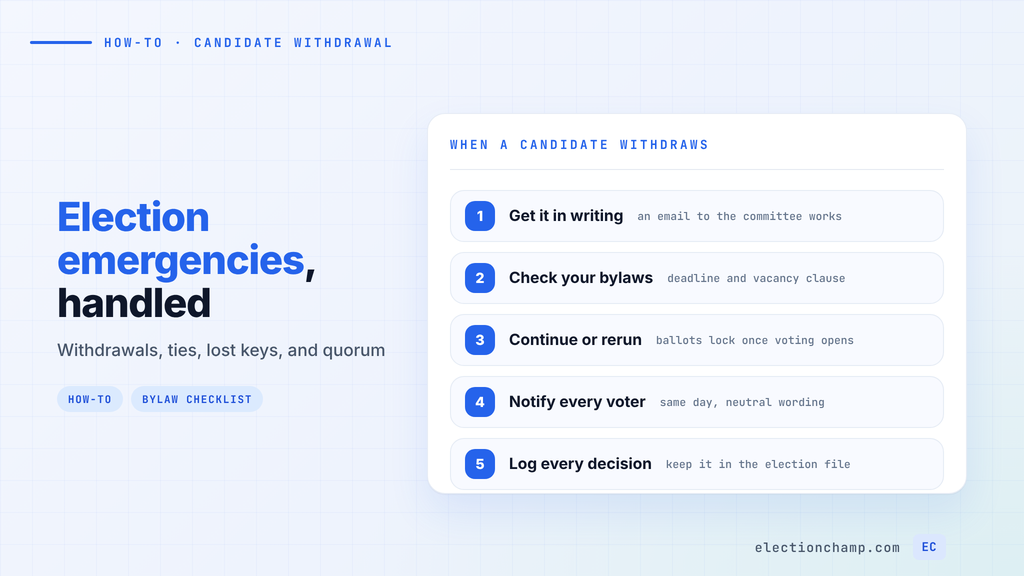
If a candidate withdraws mid-vote, get the withdrawal in writing first. An email from the candidate to the election committee is enough for most organizations. Then check your bylaws for a withdrawal deadline or a rule about names already on the ballot.
In ElectionChamp, the ballot and voter list lock at launch. You cannot remove a name from a live ballot. That protects voters who have already voted, and it means you choose between two paths.
| Situation | Usual path | What you do on the platform |
|---|---|---|
| Voting is well underway | Continue and notify voters | Email every voter about the withdrawal; leave the ballot as is |
| Few or no votes cast, and bylaws allow a restart | Close and rerun | Close early (the action is logged), then create a new election with the corrected ballot |
| Only one candidate left for one seat | Check your acclamation rule | Close early if bylaws allow the remaining candidate to be declared elected |
If you continue, send a short notice the same day. Something like this works:
[Candidate name] has withdrawn from the race for [position], effective [date]. Voting continues as scheduled and closes [date and time]. Their name remains on the ballot because ballots cannot be changed once voting opens. Questions go to [committee email].
Keep it factual. Never suggest who voters should pick instead.
Death or Disqualification of a Candidate
Treat these like a withdrawal, with more care in the wording. For a death, a brief, respectful notice is enough. For a disqualification, state the bylaw provision that applies and who made the decision. Leave out commentary. If the decision is contested, have counsel review the notice.
If the Withdrawn Candidate Wins
Decide this before results come in, so the answer cannot look tailored to the outcome. Look for the vacancy clause in your bylaws. Common answers are a board appointment until the next election, seating the next-highest finisher, or a new vote. If your bylaws are silent, adopt a rule by board resolution before voting closes and confirm it with counsel.
Setting result visibility to “no one until close” helps here. Nobody, including administrators, sees partial results while you sort out the rule.
Voter Key Lost or Election Emails Not Arriving
This is the most common problem during voting. Each voter has a unique, single-use 16-character key. If the email or text was deleted, resend it. The resend delivers the same key, so there is no risk of a second vote. Once a ballot is submitted, the key is deactivated.
When emails do not arrive at all, work through these causes in order:
- Spam or promotions folder. Ask the voter to search for the election name.
- Typo in the address. Compare the voter list against your membership records.
- Workplace filters. Some employers block bulk email. If the voter list includes a phone number, use the SMS link instead.
- No reliable email at all. Use a printed key, which the voter can scan with a phone camera.
If someone was left off the voter list, you can only add them if you created spare keys before launch. Spare keys count toward capacity, so add a few during setup. Our guide to writing election notifications that get opened covers subject lines and sender names that reduce spam filtering.
Election Tie Breaker: How to Break a Tie Vote
Your bylaws come first. If they name a tie breaker, use it exactly as written. If they say nothing and you follow Robert’s Rules, the default for a ballot election is to vote again until someone wins. Parliamentarian Paul McClintock notes that under RONR, voting “may be repeated many, many times” until a candidate reaches a majority (McClintock on voting variations).
The chair cannot rescue a ballot tie. Robert’s Rules lets the presiding officer vote to change a result only on a vote that is not by ballot (RONR FAQ 1, citing RONR 12th ed. 44:12 to 13). In a secret ballot, the chair votes with everyone else or not at all.
Common tie breakers written into bylaws include:
- A runoff among the tied candidates only
- Drawing lots or a coin toss, which many U.S. states use for public election ties (LegalClarity summary of state tie rules)
- A vote of the outgoing board
For a runoff, create a new election with only the tied candidates and reuse your voter list file. Setup takes under 10 minutes.
What If Quorum Is Not Reached
Check how your bylaws define quorum for this vote. Some count members present at a meeting. Others count ballots returned. Robert’s Rules says business cannot proceed once a quorum is absent (RONR FAQ 3, citing 40:12).
Before voting closes, send reminders to everyone who has not voted. Free elections include 1 reminder and paid elections up to 5. Administrators can see who has voted, never how. Personal calls from board members to the remaining voters can close the gap.
If you still fall short, follow the adjournment rule in your documents. California HOAs have a specific fallback. Civil Code 5115(d) lets the association adjourn to a date at least 20 days later, where the quorum to elect directors drops to 20 percent of members. A general notice must go out at least 15 days before the reconvened meeting (Civil Code 5115 text). For prevention, see how to reach quorum faster with online voting.
Election Technical Issues: Platform or Internet Problems
Voters use a browser on any phone, tablet, or computer, with no app or account. When a page will not load, have the voter try another browser, turn off a VPN or ad blocker, or switch to mobile data.
Venue Wi-Fi failures matter most in hybrid elections. Remind attendees they can vote on their own phones with cellular data. Hand printed keys to anyone who cannot get online, and track those votes in the same election.
ElectionChamp reports 99.8% uptime. If you suspect a platform issue, note the time and what voters saw, then email our support team, which is free for administrators and voters. If a disruption may have kept members from voting, your bylaws and counsel decide whether the result stands.
Handling a Disputed Election Result
Start with the records. The results CSV lists every question, candidate, count, percentage, and winner. The audit trail logs every administrative action with a timestamp, including dashboard views, voter list access, result views, and any early close.
Ballots are anonymous by design. Administrators can confirm whether a member voted, never what they chose, and no one can override that. In a dispute, you can show the count was automatic and who touched the election. You cannot reveal individual ballots, and that protects every voter.
Follow the challenge procedure in your bylaws and answer in writing. Our guide on handling HOA election disputes and challenges walks through the full process.
Your Election Emergency Plan Before Launch
Decide the answers before launch:
- Write down the withdrawal deadline and vacancy rule from your bylaws.
- Set result visibility to “no one until close.”
- Add a few spare keys for members left off the list.
- Note your tie breaker and quorum rule on one page.
- Name one person to send all voter notices.
- Preview the ballot and test with a small voter list. Setup and testing are free.
To see where each of these settings lives, read how online elections work on ElectionChamp.
Frequently Asked Questions
What happens if a candidate withdraws after voting starts?
The name usually stays on the ballot, because ballots cannot change once voting opens. Notify all voters the same day. Your bylaws decide whether votes for that candidate count and who fills the seat if they win. If few votes are cast and bylaws allow it, you can close and rerun the election.
How do you break a tie in an organization election?
Follow the tie breaker in your bylaws. Common rules are a runoff among the tied candidates, drawing lots, or a board vote. Under Robert’s Rules, a ballot election is repeated until someone wins, and the chair cannot break a ballot tie after the count.
Can you change a ballot after an online election starts?
On ElectionChamp, no. The ballot and voter list lock at launch to protect votes already cast. If the ballot must change, close the election early and create a new one with the corrected ballot.
What should a voter do if they lose their voting key?
Ask the administrator to resend it. The resend delivers the same single-use key, so the voter can still vote once. If the email never arrives, check spam, confirm the address, or use SMS or a printed key.
Planning your next vote? Read about how online elections work and the full feature list, or see pricing: free up to 20 voters, $10 up to 200, then $0.05 per voter.