ElectionChamp
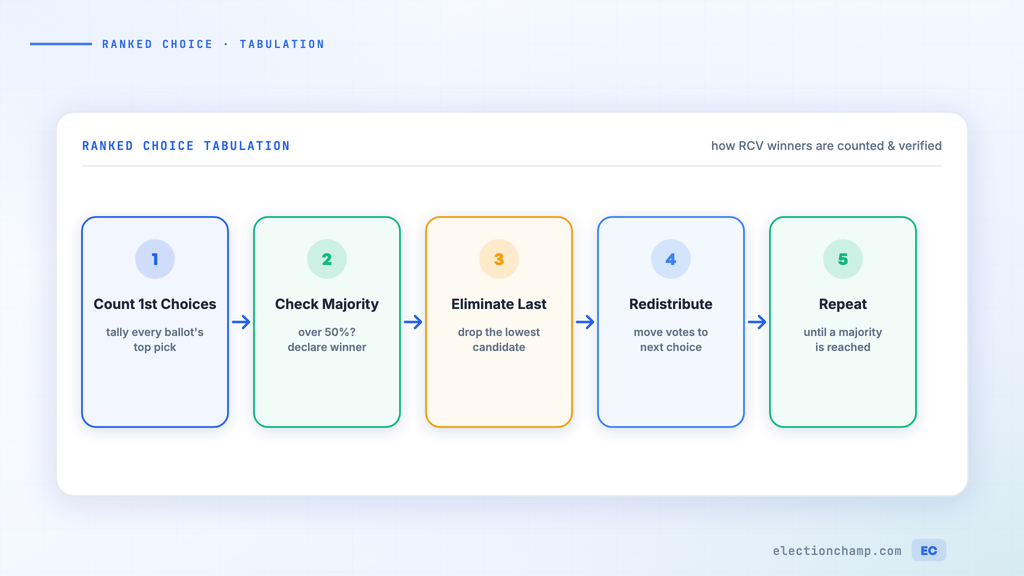
Short answer: to count ranked choice votes, either give each ranking points (Borda Count) or eliminate the last-place candidate round by round until someone has a majority (instant runoff). This guide walks through both with worked examples. To skip the math, download the free ranked choice voting calculator for Excel. It counts both methods from your ballots.
Understanding How Ranked Choice Votes Are Counted
Ranked choice voting asks voters to rank candidates in order of preference rather than picking just one. But how are those rankings actually turned into a winner? The counting process depends on which RCV method you’re using — and understanding the math helps you verify results and explain them to your voters.
This guide covers the two most common RCV methods: Borda Count (used by ElectionChamp’s Ranked Choice option) and Instant Runoff Voting (IRV), with step-by-step examples you can follow and verify.
Method 1: Borda Count
In a Borda Count, each ranking position is assigned points. The candidate with the most total points wins. This method rewards broad consensus — a candidate who is everyone’s second choice may win over a candidate who is half the voters’ first choice and half the voters’ last choice.
How Points Are Assigned
With N candidates, a 1st-place ranking gets N points, 2nd place gets N-1 points, and so on down to 1 point for last place.
|
Ranking |
Points (5 candidates) |
Points (4 candidates) |
Points (3 candidates) |
|
1st place |
5 points |
4 points |
3 points |
|
2nd place |
4 points |
3 points |
2 points |
|
3rd place |
3 points |
2 points |
1 point |
|
4th place |
2 points |
1 point |
— |
|
5th place |
1 point |
— |
— |
Worked Example: Borda Count
Election: 3 candidates (Alice, Bob, Carol), 10 voters, each ranks all 3 candidates.
|
Voter Group |
# of Voters |
1st Choice |
2nd Choice |
3rd Choice |
|
Group A |
4 voters |
Alice |
Bob |
Carol |
|
Group B |
3 voters |
Bob |
Carol |
Alice |
|
Group C |
3 voters |
Carol |
Alice |
Bob |
Points calculation (3 candidates: 1st = 3 pts, 2nd = 2 pts, 3rd = 1 pt):
|
Candidate |
1st Place Points |
2nd Place Points |
3rd Place Points |
Total |
|
Alice |
4 × 3 = 12 |
3 × 2 = 6 |
3 × 1 = 3 |
21 points |
|
Bob |
3 × 3 = 9 |
4 × 2 = 8 |
3 × 1 = 3 |
20 points |
|
Carol |
3 × 3 = 9 |
3 × 2 = 6 |
4 × 1 = 4 |
19 points |
Result: Alice wins with 21 points, even though she didn’t have the most first-place votes by a huge margin. Alice won because she was a strong second choice for Group C, giving her broad support across the electorate.
Method 2: Instant Runoff Voting (IRV)
IRV eliminates the candidate with the fewest first-place votes in each round, redistributing their votes to the next-ranked candidate on each ballot, until one candidate achieves a majority.
Worked Example: IRV
Same election: 3 candidates, 10 voters.
Round 1: Count first-place votes.
- Alice: 4 votes | Bob: 3 votes | Carol: 3 votes
- No candidate has a majority (>5). Eliminate the candidate with fewest votes. Bob and Carol are tied at 3; tiebreaker eliminates Carol (or per your rules).
Round 2: Carol is eliminated. Her 3 voters’ ballots transfer to their next choice (Alice).
- Alice: 4 + 3 = 7 votes | Bob: 3 votes
- Alice achieves a majority (7 out of 10) and wins.
Note: Under IRV, Alice wins with a majority after Carol is eliminated. Under Borda Count, Alice also wins — but by a narrower margin based on overall point totals. The methods can produce different winners in more complex elections.
Free Ranked Choice Voting Calculator (Excel Template)
The template counts a ranked choice election two ways from the same ballots: Borda Count points and instant runoff rounds. It works in Excel, Google Sheets, and LibreOffice, and holds up to 8 candidates and 500 ballots.
Download the ranked choice voting calculator (.xlsx)
How to Use the Calculator
- On the Ballots tab, type your candidate names in row 5.
- Enter one ballot per row: 1 under the voter’s first choice, 2 under their second, and so on. Leave a cell blank if the voter did not rank that candidate.
- Open the Borda Count tab for point totals and the winner.
- Open the Instant Runoff tab to see each round: votes per candidate, who is eliminated, and when a candidate passes 50% of active ballots.
- Cross-check the winner against your voting platform’s results.
If two candidates tie for last place in a runoff round, the sheet eliminates the leftmost one. Your bylaws may set a different tie-break rule, so check before you certify.
Hand counting gets slow past a few dozen ballots. ElectionChamp counts ranked choice ballots with Borda points automatically the moment voting closes, and results show point totals. It does not run instant runoff, so if your rules require IRV, export the ranked results as CSV and run the count in a separate tool. For multi-seat STV, export the ranked results and run them through our free STV Excel calculator.
When to Use Ranked Choice vs. Plurality
|
Scenario |
Best Method |
Why |
|
Single winner, 2 candidates |
Plurality |
Ranked choice adds no value with only 2 options |
|
Single winner, 3+ candidates |
Ranked Choice |
Ensures the winner has broad support, not just the largest faction |
|
Multiple winners |
STV or Plurality with multiple winners |
STV gives proportional representation; Plurality is simpler |
|
Board election, 1 seat |
Ranked Choice |
Finds the consensus candidate across the whole electorate |
|
Yes/No question |
Plurality |
Binary choices don’t benefit from ranking |
Why Automated Counting Matters
For elections with more than a handful of voters, manual RCV counting is error-prone and time-consuming:
- A Borda Count with 200 voters and 5 candidates involves 1,000 individual point assignments to sum
- IRV with complex ballots can require dozens of elimination rounds
- Human counting errors in RCV are more common than in simple plurality because the math is more complex
- ElectionChamp calculates ranked choice results with Borda points automatically and instantly — no manual counting, no errors, no delays
Frequently Asked Questions
Can I use Excel as a ranked choice voting calculator?
Yes. Enter each ballot as a row of rankings, then total Borda points with SUMPRODUCT or tally first choices round by round for instant runoff. The free template above does both automatically.
How do you count ranked choice votes by hand?
For instant runoff, count first choices. If no one has more than half, eliminate the candidate with the fewest votes and move those ballots to their next choice. Repeat until a candidate has a majority.
What is the difference between Borda Count and instant runoff?
Borda Count gives points for every ranking and the highest total wins. Instant runoff counts only each ballot’s top remaining choice and eliminates candidates until one has a majority. The two methods can pick different winners.
Run your next ranked choice election on ElectionChamp: free up to 20 voters, $10 up to 200. See pricing or set up a board election.