ElectionChamp
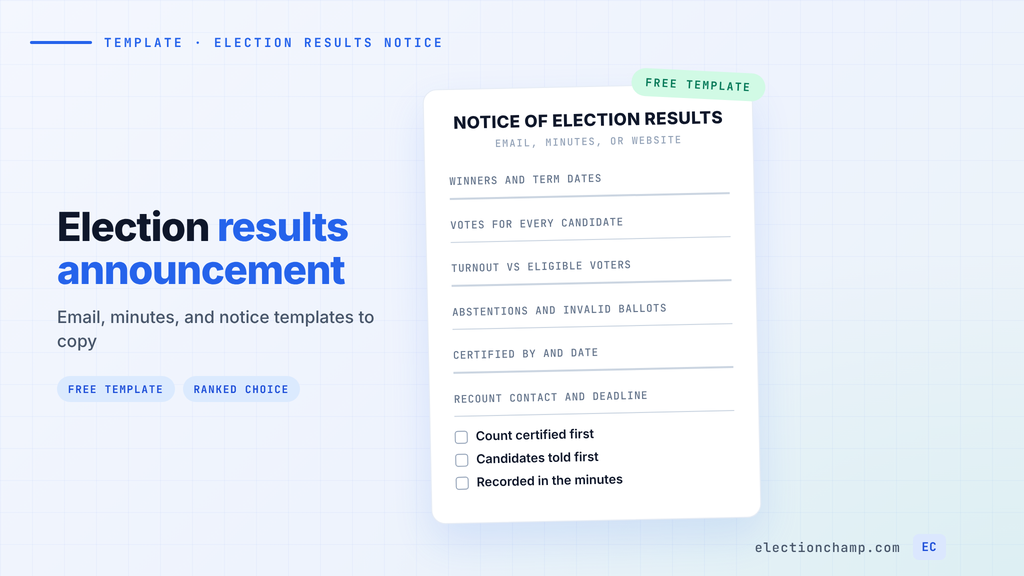
Short answer: An election results announcement tells members who won, the vote count for each candidate or motion, turnout against eligible voters, and who certified the count. It also says how to raise a question or request a recount, and when the new board takes office. Copy the four templates below: a results email to members, a minutes entry, a website or newsletter notice, and a ranked choice or STV version that explains each round.
To make sense of the raw numbers first, see our guide on how to read and share your election results.
What to Include in an Election Results Announcement
A Robert’s Rules tellers’ report lists the votes cast, the votes needed to win, each candidate’s total, and any illegal votes. The Department of Labor’s guide for union mail ballot elections asks officials to report valid, void, and unresolved challenged ballots for each office. Your notice should carry the same detail.
- Winners: name, position, and term dates for each seat filled.
- Counts and percentages: votes for every candidate, not just the winners, plus yes and no totals for each motion.
- Turnout: ballots cast out of eligible voters, and whether quorum was met if your bylaws set one.
- Abstentions and invalid ballots: on separate lines, kept out of the percentage base unless your bylaws say otherwise.
- Certification: who counted and certified the result (inspector of elections, tellers, or election committee) and the date.
- Questions and recounts: who to contact and the deadline, with the bylaw section that governs challenges.
- Next steps: when new directors take office and the date of the first board meeting.
Leave out anything that could reveal how a person voted. If a tie occurred, say how it was broken and cite the bylaw. If a result is challenged, see our guide to handling HOA election disputes.
Election Results Announcement Templates (Email and Notice)
Send version 1 and post version 3 on the same day, then add version 2 to the minutes.
| Template | Use it for | Who sends it |
|---|---|---|
| 1. Results email | All voters and members, right after certification | Board chair, secretary, or election committee |
| 2. Minutes entry | The record of the next board or member meeting | Secretary |
| 3. Website or newsletter notice | Members who missed the email, and your public record | Secretary or manager |
| 4. Ranked choice or STV | Any race counted in rounds | Election committee |
Replace the bracketed text, fill the blanks, and delete the lines you do not need.
Download: Election Results Announcement Template (Email and Notice) (Word .docx)
VERSION 1: ELECTION RESULTS EMAIL TO MEMBERS
Subject: [Organization Name] [Year] election results
Hello [members / owners],
The [election name] closed on ________ at ________. Thank you to everyone who voted and to every candidate who stood for election.
Turnout: ________ of ________ eligible voters cast a ballot (____%). The quorum of ________ [was / was not] met.
[Position or seat] (________ seats)
[Candidate name]: ________ votes (____%), elected
[Candidate name]: ________ votes (____%)
Abstentions: ________ Invalid or void ballots: ________
[Motion or question]
Yes: ________ No: ________ Abstain: ________. The motion [passed / failed]. Required to pass: ________.
Certification: The results were counted and certified by ________ [inspector of elections / tellers / election committee] on ________.
Questions or recount requests: Contact ________ by ________, as set out in [bylaws section ________].
Next steps: New [directors / officers] take office on ________. The first board meeting is on ________ at ________.
Full results: ________ [link or attachment]
[Name], [Title], on behalf of the [board / election committee]
VERSION 2: BOARD OR MEETING MINUTES ENTRY
Election results. The [chair / secretary] reported the results of the [election name], held from ________ to ________ by [online / mail / in-person / hybrid] ballot and certified by ________ on ________.
Eligible voters: ________ Ballots cast: ________ Quorum required: ________ [met / not met]
Votes necessary for election: ________ [majority of votes cast / plurality / as set by the bylaws]
[Position]: [Candidate] ________ votes; [Candidate] ________ votes; write-ins ________; invalid ________.
[Candidate names] were declared elected to [position] for a term ending ________.
The certified tally is attached to these minutes and will be kept with the election records until ________.
VERSION 3: WEBSITE OR NEWSLETTER NOTICE OF ELECTION RESULTS
Notice of Election Results: [Organization Name] [Year] [Annual / Board] Election
Date posted: ________
The election closed on ________. ________ of ________ eligible members voted (____%).
Elected: [Name], [Position], term ________ to ________.
[Motion]: [Passed / Failed], with ________ yes, ________ no, and ________ abstaining.
Results were certified by ________ on ________. Members can review the full tally at ________ or request it from ________.
Questions or recount requests must reach ________ by ________.
Thank you to the candidates, volunteers, and members who took part.
VERSION 4: RANKED CHOICE OR STV RESULTS (EXPLAINS THE ROUNDS)
[Position] (________ seats), counted by [instant runoff / single transferable vote]
How the count works: Each ballot counts for the voter’s highest-ranked candidate still in the race. [STV only: A candidate who reaches the quota of ________ votes wins a seat. Their surplus votes move to the next choices on their ballots.] When no candidate [has a majority / reaches the quota], the candidate with the fewest votes is eliminated. Their ballots move to each voter’s next choice. This repeats until [one candidate has a majority / every seat is filled].
Round 1: [Candidate A] ________, [Candidate B] ________, [Candidate C] ________. [Candidate C] eliminated.
Round 2: [Candidate A] ________, [Candidate B] ________. [Candidate C]’s ballots moved ________ to A and ________ to B, and ________ had no further choice. [Candidate A] elected.
Final result: [Name(s)] elected to [position].
Exhausted ballots (no remaining choices): ________. The full round-by-round tally is available at ________.
How to Announce Election Results
- Certify the count. Check that ballots cast match the number of voters marked as voted, then get the inspector’s or tellers’ sign-off in writing.
- Tell the candidates. Call or email each candidate just before the member notice goes out.
- Send the results email. Use version 1 and link to the full tally. In ElectionChamp, results are ready the moment voting closes, and one click emails a results link to every voter.
- Post the notice. Put version 3 on your website, newsletter, or notice board.
- Record it in the minutes. Add version 2 at the next meeting and attach the certified tally.
- Archive the records. Keep the tally, the results CSV, and the audit log for as long as your bylaws require.
Some groups face fixed deadlines. California HOAs must record the results in the minutes of the next board meeting. They must also give general notice of the tabulated results within 15 days, under Civil Code section 5120. For union officer elections, the Department of Labor election checklist says to publish and post results promptly and keep election records for at least one year. Everyone else should confirm timing with their bylaws and counsel.
Online, set result visibility before launch. ElectionChamp can show results to no one until close or to administrators in real time. Our instant results feature also gives you a CSV with questions, candidates, counts, percentages, and winners for versions 1 and 2. Abstentions appear separately when “Allow Abstain” is on.
How to Explain Ranked Choice and STV Results
A ranked race confuses members when the notice shows only the final round. A candidate who led in round 1 and lost in round 3 looks like an error unless each transfer is shown. Version 4 gives one line per round.
- Instant runoff (one seat): show every round until a candidate has a majority of the ballots still active.
- STV (several seats): state the quota up front, then show who reached it, where surplus votes went, and who was eliminated in each round.
- Exhausted ballots: report ballots that ran out of ranked choices, so the totals in later rounds add up.
Points-based methods work differently. ElectionChamp’s ranked choice option uses a Borda Count variant: a first-place rank earns the most points and the highest total wins. Report each candidate’s point total in the version 1 format instead. To check a ranked count by hand, use our ranked choice voting calculator guide.
Frequently Asked Questions
Should you announce the vote count for each candidate?
Usually, yes. A Robert’s Rules tellers’ report lists the votes cast, the votes needed to win, and each candidate’s total. Department of Labor guidance for union elections asks for the tally for each office. Check your bylaws for any rule on what to publish.
How soon should election results be announced?
As soon as the count is certified. The Department of Labor tells union officials to publish and post results promptly. California HOAs must give general notice of the tabulated results within 15 days of the election. Other organizations should follow their bylaws.
Do abstentions count in election results?
Under Robert’s Rules, abstentions are not counted as votes cast, so they do not change the votes needed to win. Listing them on a separate line still shows members how many people took part. Confirm the percentage base with your bylaws.
What should an election results email say?
It should name the winners, give the vote counts, show turnout against eligible voters, and say who certified the count. Add how to request a recount and by when, plus when new officers take office. Link to the full tally.
Planning your next vote? Read about instant results and voter notifications, or see pricing: free up to 20 voters, $10 up to 200, then $0.05 per voter.