ElectionChamp
Short answer: The best online voting software for nonprofits gives each member a single-use ballot key, keeps ballots anonymous, logs every admin action, and stays cheap at 50 to 2,000 voters. Published per-election prices run from $10 to about $300 as of October 2026. ElectionChamp costs $10 up to 200 voters, then $0.05 per voter, with every feature included.
This guide compares six platforms nonprofits shortlist most often: ElectionChamp (ours), ElectionBuddy, OpaVote, Simply Voting, eBallot, and Election Runner. Every price comes from the vendor’s public pricing page, checked October 3, 2026. We point out where competitors are stronger, because the right pick depends on your bylaws and your election.
What Nonprofits Need From Online Voting Software
A nonprofit board election or bylaw vote carries governance weight. A member can challenge it, and a funder may ask how it was run. Check these requirements before you compare prices.
| Requirement | Why it matters | What to check in the software |
|---|---|---|
| Bylaw compliance | Your bylaws set who votes, notice periods, quorum, and the voting method | Supports the method your bylaws name (plurality, ranked, STV, yes/no motions) and lets you set open and close dates |
| Member eligibility list | Only members in good standing should get a ballot | Voter list import, one key per member, spare keys for late renewals, weighted votes if member classes differ |
| Anonymity | Members vote more freely when no one can see their choices | Admins see who voted, never how; no setting can reveal ballots |
| Audit trail | Disputes and funder questions need a record | Timestamped log of admin actions and downloadable results |
| Reach | Some members have no email or prefer to vote in person | SMS delivery, printed keys, and hybrid in-person voting |
| Cost at 50 to 2,000 members | Volunteer budgets, often several votes a year | Per-election pricing, no feature gating, total cost for a year of votes |
Many older bylaws say nothing about online voting, or they require “written ballots.” State nonprofit corporation laws also differ on electronic notice and ballots. Confirm with your bylaws and counsel before you choose a tool.
Online Voting Software for Nonprofits Compared
Here is how the six platforms differ on free tiers, billing, and genuine strengths. Details are from each vendor’s site as of October 2026.
| Platform | Free tier | Pricing model | Stands out for |
|---|---|---|---|
| ElectionChamp | Up to 20 voters, all features | Pay per election, no subscription | Every feature on every plan; lowest published price at 500 and 2,000 voters |
| ElectionBuddy | Up to 20 voters | Per election, four tiers | Long track record, mailed and printed ballots, API and phone support on Professional |
| OpaVote | Up to 25 voters and 10 candidates | $10 per 125 voters or 20 candidates | Ranked methods (IRV, STV, Condorcet) and counting ballots collected elsewhere |
| Simply Voting | Up to 10 voters | Online calculator; annual plans save 15% or more | SOC 2 certification, uptime SLA, telephone voting as a premium feature |
| eBallot | None | Monthly subscription with a minimum term, or annual Business license | Managed and self-service options |
| Election Runner | Up to 20 voters | Per election, published tiers up to 300 voters | Built with schools in mind, with K-12 and university discounts |
Sources: ElectionBuddy pricing, OpaVote pricing, Simply Voting pricing, eBallot pricing, Election Runner pricing, and ElectionChamp pricing.
How Much Does a Secure Voting Platform Cost for Nonprofits?
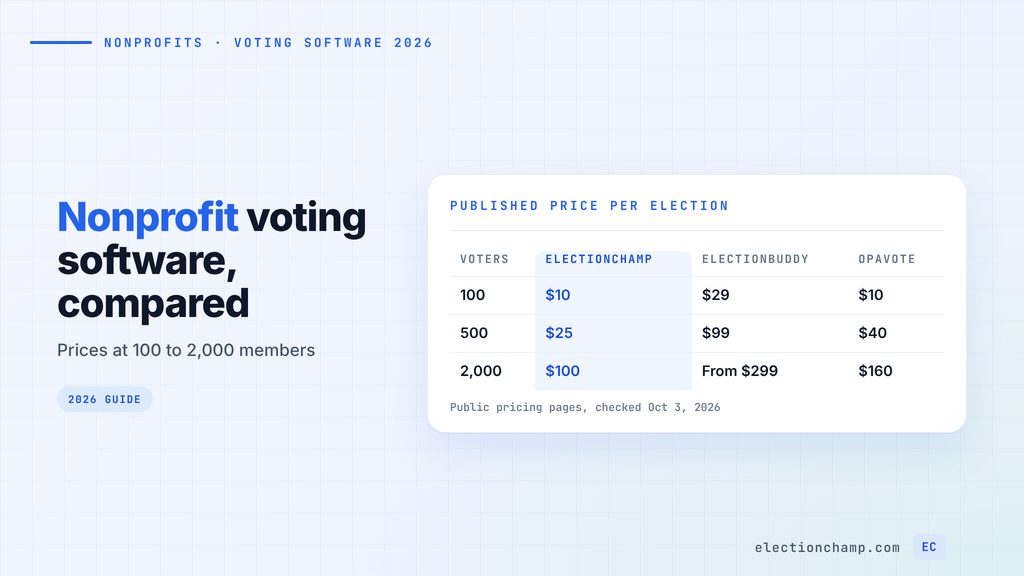
A nonprofit with 50 to 2,000 voting members pays between $10 and about $300 per election on published self-service pricing, as of October 2026. Mailed ballots, fully managed elections, and very large lists are usually quoted. The table shows published prices at three common member counts.
| Platform | 100 voters | 500 voters | 2,000 voters |
|---|---|---|---|
| ElectionChamp | $10 | $25 | $100 |
| ElectionBuddy | $29 (Plus) | $99 (Premium) | From $299 (Professional) |
| OpaVote | $10 | $40 | $160 |
| Election Runner | $19 | Custom quote | Custom quote |
| Simply Voting | Calculator only | Calculator only | Calculator only |
| eBallot | Not published | Not published | Business from $2,500 a year |
Read the fine print behind each number:
- ElectionChamp prices on total capacity, meaning voters plus any spare keys. Setup and testing are free, and you pay by card at launch.
- ElectionBuddy prices on voter list size, not turnout. SMS is a $29 add-on on Plus and included on Premium. It offers size-based discounts if you run 4 or more elections a year.
- OpaVote charges $10 per 125 voters or per 20 candidates, so a long candidate slate can raise the price. Data is kept 3 months free, then $40 a year.
- Simply Voting shows an estimate after you enter your voter count. Weighted votes, online nominations, telephone voting, and voter segmentation cost extra.
- eBallot Essential Pro is $6.99 a month with a 6-month minimum, for up to 50 voters. Essential Premium is $4.99 a month with a 12-month minimum.
Price a full year, because most nonprofits vote more than once. At 500 members and three votes a year, published prices total $75 on ElectionChamp, $120 on OpaVote, and $297 on ElectionBuddy. For more sizes and vendors, see our online voting software pricing guide.
Best Online Voting Software for Nonprofits: Platform Reviews
ElectionChamp
We built ElectionChamp for organizations that run a few governance votes a year and do not want a subscription. It is free up to 20 voters, $10 flat up to 200, then $0.05 per voter. Weighted voting, SMS, and every other feature are on every plan. For an STV count, export ranked results to our free STV Excel calculator.
For a nonprofit board, the parts that matter are single-use 16-character voter keys and anonymous ballots that admins cannot trace. A timestamped audit trail logs every admin action. One ballot can mix candidate races with photos and bios, nomination questions where members type in names, and yes/no/abstain motions. Results are instant at close and download as CSV. Members without email can vote with SMS links or printed keys at your annual meeting.
The trade-offs are real. We hold no SOC 2 or ISO certification; security rests on AES-256 encryption at rest and SSL/TLS in transit. Our ranked choice method is a Borda count variant, so check it if your bylaws require instant runoff. Free elections get 1 reminder and paid elections get up to 5. Our page on online voting for nonprofits covers member and board setups.
ElectionBuddy
ElectionBuddy has a long track record and the widest service range in this group. Professional (from $299, up to 100,000 voters) adds mailed and printed ballots, postcard notices, API access, and phone support. Premium ($99, up to 1,000 voters) includes SMS, two-factor authentication, and proxy transfers.
For small nonprofits, note that weighted voting starts on Plus ($29, up to 350 voters). Results on the free plan stay accessible for 30 days. ElectionBuddy fits best if you need mailed ballots or proxy transfers from one vendor.
OpaVote
OpaVote is strong on ranked methods, including instant runoff, STV, and Condorcet. Its Counts feature tallies ballots you collected elsewhere, which helps when part of a vote happened on paper. The free tier covers 25 voters and 10 candidates, with up to 3 elections at a time.
Pricing scales with candidates as well as voters, and data storage beyond 3 months costs $40 a year. OpaVote fits best when your bylaws name a specific ranked method such as IRV.
Simply Voting
Simply Voting holds SOC 2 certification and offers a contractual uptime SLA, per its site. That matters if your nonprofit has an IT or procurement review that asks for a SOC 2 report. Telephone voting helps members who will not vote online.
Prices appear only through the calculator, and several features nonprofits use (weighted votes, online nominations) cost extra. Annual plans save 15% or more if you run several votes a year.
eBallot
eBallot offers managed and self-service elections, which suits a nonprofit that wants a vendor to run the vote. It has no free tier. Its subscription model, with 6 or 12-month minimums on Essential plans, fits organizations that vote often better than one with a single annual election.
Election Runner
Election Runner was built with schools in mind and offers K-12 and university discounts. Pricing is free up to 20 voters, $19 up to 100, and $36 up to 300. Above 300 voters you need a custom quote, so it fits smaller nonprofits best.
Secure Online Voting for a Nonprofit Board: What to Verify
“Secure” means different things on different sales pages. For a board or member election, verify these controls with any vendor:
- One ballot per member. Each voter gets a unique key that deactivates after use. A shared link lets anyone with it vote, sometimes more than once.
- Anonymity by design. Admins can see whether someone voted, never what they chose. Ask whether any admin setting can reveal ballots.
- An audit trail. A timestamped log of admin actions, such as viewing results or closing early, is your answer to a dispute.
- Encryption in transit and at rest. Ask which standard the vendor uses.
On certifications, Simply Voting has SOC 2 and ElectionChamp does not. If your board or a funder requires a SOC 2 report, that narrows the list. If not, judge vendors on the controls above. Our explainer on how voter anonymity and ballot secrecy work covers what to ask.
How to Choose Nonprofit Election Software
Work through these steps with your board secretary or election committee:
- Read your bylaws. Note the voting method, notice period, quorum, and any secret ballot or “written ballot” language.
- Count eligible voters. Export your member list and remove lapsed members. Add spare keys for members who renew late.
- Price a full year. Multiply the per-election price by the votes you expect, including bylaw amendments and budget approvals.
- Check special needs. Mailed ballots point to ElectionBuddy. A required IRV count points to OpaVote. A mandatory SOC 2 report points to Simply Voting.
- Run a test election. Send a ballot to two or three board members first. ElectionChamp setup and testing are free.
For the full process from nominations to certified results, read our guide to running nonprofit board elections online.
Frequently Asked Questions
How much does a secure voting platform cost for nonprofits?
For 50 to 2,000 voting members, published self-service prices run from about $10 to $300 per election as of October 2026. ElectionChamp costs $10 up to 200 voters and $0.05 per voter above that, so 500 voters is $25 and 2,000 is $100. Managed elections and mailed ballots are usually quoted.
Can a nonprofit hold board elections online?
Often yes, but it depends on your bylaws, articles, and state nonprofit law. Some older bylaws require written or in-person ballots and need an amendment first. Confirm with your bylaws and counsel before you send ballots.
Is online voting anonymous for nonprofit board elections?
It is on platforms that separate ballots from voter identities. On ElectionChamp, admins can see whether a member voted but never what they chose, and no setting overrides that. Ask any vendor the same question before you buy.
Can we use Google Forms for a nonprofit board election?
Google Forms suits informal polls. It has no single-use voter keys and no log of admin actions. If you skip email collection, you cannot confirm who voted. For contested seats or bylaw votes, use voting software with one key per member and an audit trail.
Planning your next vote? Read about nonprofit board voting and board elections, or see pricing: free up to 20 voters, $10 up to 200, then $0.05 per voter.