ElectionChamp
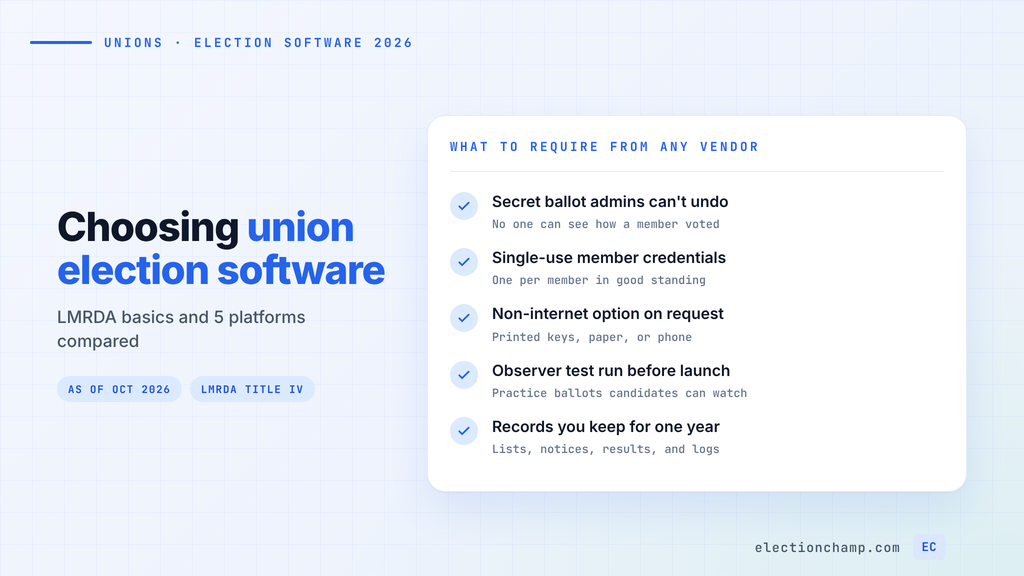
Short answer: The best union election software keeps ballots secret from administrators and gives each member in good standing a single-use credential. It should also offer a non-internet option on request and produce records you can preserve for a year. As of October 2026, a 1,000-member election costs $50 on ElectionChamp, $80 on OpaVote, and $99 on ElectionBuddy Premium. Check the safeguards first, then compare price.
We run ElectionChamp, so weigh this page with that in mind. Every competitor price below comes from the vendor’s public page, checked October 3, 2026, and linked so you can verify it. Where another platform fits a union better, we say so.
Can Union Officer Elections Be Held Online?
Yes, for most unions, if the election meets the Labor-Management Reporting and Disclosure Act (LMRDA) and your constitution allows it. The Department of Labor’s Office of Labor-Management Standards (OLMS) publishes a compliance tip on remote electronic voting, last updated December 10, 2024. It describes the safeguards OLMS looks at when it reviews an online officer election.
Title IV of the LMRDA covers officer elections in private sector and federal sector unions. Per the OLMS LMRDA fact sheet, unions representing solely state, county, and municipal employees are not covered. Those unions follow state law and their own constitution instead.
These are the Title IV basics a local union’s software and process must support:
| Rule | What the Law Says | Source |
|---|---|---|
| How often | Local unions elect officers at least once every three years, by secret ballot among members in good standing | 29 U.S.C. 481(b) |
| Secret ballot | The ballot must be cast so the voter “cannot be identified with the choice expressed” | 29 U.S.C. 402(k) |
| Notice | Mailed to each member’s last known home address at least 15 days before the election, with the date, time, place, and offices to be filled | 29 CFR 452.99 |
| Eligibility | Every member in good standing may vote and run, without penalty or interference | 29 U.S.C. 481(e) |
| Observers | Any candidate may have an observer at the polls and at the counting of the ballots | 29 U.S.C. 481(c) |
| Records | Ballots and all other election records preserved for one year | 29 U.S.C. 481(e) |
| Offline members | Internet access or another voting method must be provided, on request, to members without internet | OLMS compliance tip |
Two of these trip up first-time online elections. Regulation 452.99 says the notice must be mailed, and that posting or hand delivery will not satisfy it. Plan on a mailed notice even when ballots go out by email or text.
The OLMS election FAQs also say a member whose dues are checked off by the employer cannot be disqualified because of a delay in payment. Build your eligibility list with that in mind. Our union election compliance guide covers candidate rights and campaign literature in more depth. Confirm your own process with your constitution, bylaws, and counsel.
What to Require From Union Election Software
OLMS does not publish a list of approved vendors. It looks at the totality of the facts in each election. Use the safeguards from its compliance tip as your vendor scorecard:
- Secrecy admins cannot switch off. Votes should be separated from identities so no officer or staff member can see how anyone voted.
- One credential per member, used once. Each eligible member gets a unique credential that stops working after the ballot is cast.
- Stronger login where you need it. OLMS lists multi-factor authentication as a favorable factor. Ask each vendor what it offers and on which plan.
- A non-internet path. Printed credentials, paper ballots, or phone voting for members who ask, counted in the same election.
- Observer access. OLMS names a test run on practice ballots and detailed transaction logs as ways observers can verify the system.
- Records you control. Results, eligibility lists, and logs you can keep for the full year, even if the vendor deletes its copy sooner.
- Shift worker reach. SMS and email delivery, mobile voting with no app, and enough reminders to cover a multi-day window.
Ask every vendor in writing how it handles each item. Keep the answers with your election records.
Union Election Software Compared: 5 Platforms
This table maps five platforms to the scorecard above, using their public pages as of October 2026.
| Platform | Union Strengths | Watch For |
|---|---|---|
| ElectionChamp | Anonymous ballots admins cannot override; single-use 16-character keys; printed keys for offline or on-site members; SMS, email, and every feature on every plan | No SOC 2 or ISO certification; voters sign in with a single-use key, with no multi-factor login listed |
| ElectionBuddy | Union page says it follows OLMS online voting requirements; two-factor authentication on Premium; mailed and printed ballots, postcard notices, and phone support on Professional | SMS is a $29 add-on on Plus; two-factor needs Premium; meeting votes are priced separately |
| Simply Voting | Telephone voting, postal mailings, and paper ballot printing as add-ons; managed elections with a project manager; SOC 2 Type 1 listed on its security page | Price only through an online calculator; telephone voting, nominations, and weighted votes cost extra |
| eBallot | Business plan includes hybrid voting, phone touchpad voting, a certified results report, and dedicated project managers | No free tier; Essential plans cap at 50 voters, so most locals land on Business |
| OpaVote | Strong ranked methods (IRV, STV, Condorcet); “Counts” tallies ballots collected elsewhere | No union features listed; data kept 3 months on paid elections, then $40 a year |
Sources: ElectionBuddy for unions, ElectionBuddy pricing, Simply Voting pricing, eBallot pricing, and OpaVote pricing, all as of October 2026. Check Simply Voting’s site for its current SOC 2 status.
Each platform has a real case. ElectionBuddy has a long track record and can mail paper ballots, which helps a local with many offline members. Simply Voting and eBallot suit unions that want the vendor to manage the vote or need phone voting. OpaVote is the pick for complex ranked or proportional counts.
Our union voting software fits locals that run their own elections and want every feature at a low published price. Members vote in a browser on any phone with no app or account. Printed keys let stewards hand credentials to members who ask for a non-internet option, and those votes count in the same election. Our security rests on AES-256 encryption at rest, SSL/TLS in transit, single-use keys, and a timestamped audit trail of every admin action.
How Much Does Union Voting Software Cost?
Most vendors price by the size of the voter list, not by turnout. The table shows published prices for one election as of October 2026.
| Platform | 200 Members | 500 Members | 1,000 Members | 5,000 Members |
|---|---|---|---|---|
| ElectionChamp | $10 | $25 | $50 | $250 |
| ElectionBuddy | $29 Plus | $99 Premium | $99 Premium | Professional, from $299 ($599 example quote) |
| OpaVote | $20 | $40 | $80 | $400 |
| Simply Voting | Online calculator | Online calculator | Online calculator | Online calculator |
| eBallot | Business, $2,500 a year | Business, $2,500 a year | Business, $2,500 a year | Business, $2,500 a year |
How each price works:
- ElectionChamp: free up to 20 voters, $10 flat for 21 to 200, then $0.05 per voter. Price counts voters plus any spare keys. Setup and testing are free, with no subscription.
- ElectionBuddy: Plus covers up to 350 voters and Premium up to 1,000. A local that wants two-factor authentication needs Premium at any size. Its Professional page quoted a 5,000-voter election at $599.
- OpaVote: $10 for every 125 voters or 20 candidates. A long slate can raise the price. Keeping data for the full LMRDA year costs $40 after the first 3 months, or you export it yourself.
- eBallot: Essential plans start at $6.99 a month on a 6-month minimum and cap at 50 voters. Business is an annual license at $2,500, varying by vote.
- Simply Voting: elections with 10 voters or fewer are free. Above that, use its calculator. Annual plans save 15% or more if you run several votes a year.
Price is the last filter, after the safeguards and the offline option. For a local that votes several times a year, add up officer elections, ratifications, and bylaw votes before you compare.
Officer Elections vs. Contract Ratification and Strike Votes
Title IV governs officer elections. Contract ratification and strike votes are set mainly by your constitution, bylaws, and international’s rules, so read those before you pick a method or a timeline.
The software needs are close. Ratification is usually a yes or no motion with a short window, so delivery speed and reminders matter most. Strike votes call for the same secrecy as officer elections, since members may face pressure over how they voted.
On our platform, a motion question offers yes, no, and abstain, and results can stay hidden from everyone until voting closes. Paid elections allow up to 5 reminders, which helps reach members on rotating shifts. You can put a ratification question and a bylaw change on one ballot, each with its own voting method.
How to Run an Online Union Election Step by Step
This sequence follows the Title IV rules above. Our walkthrough of a union officer election using online voting adds ballot and notice examples.
- Confirm the authority. Check that your constitution and bylaws permit electronic voting. If they are silent, ask your international or counsel.
- Build the eligibility list. Include every member in good standing, and do not drop dues checkoff members over late employer payments.
- Mail the notice. Send it to home addresses at least 15 days before voting opens. State the voting period, offices, how credentials arrive, and how to request a non-internet option.
- Run a test with observers. Invite candidate observers to watch a practice election before launch. On ElectionChamp, test elections are free.
- Open voting and remind. Send credentials by email and SMS, print keys for members who asked, and schedule reminders across shifts.
- Close, report, and preserve. Share results with members, then keep the eligibility list, notices, results file, and logs for one year.
Frequently Asked Questions
Can union officer elections be held online?
Yes, for most unions, if the election meets LMRDA Title IV and the union’s constitution allows it. OLMS publishes a compliance tip on remote electronic voting that lists the safeguards it reviews. Confirm your process with your constitution, bylaws, and counsel.
Is there LMRDA compliant voting software?
OLMS does not approve or list voting vendors. It reviews whether each election met the law, based on the facts. Software can support compliance with secret ballots, single-use credentials, and records you keep for a year, but the union still runs the process.
Does a union have to mail the election notice if voting is online?
Yes. Under 29 CFR 452.99, the notice must be mailed to each member’s last known home address at least 15 days before the election. Posting or hand delivery does not satisfy the rule.
How much does union election software cost?
As of October 2026, published prices for a 1,000-member election are $50 on ElectionChamp, $80 on OpaVote, and $99 on ElectionBuddy Premium. eBallot’s Business plan is $2,500 a year, and Simply Voting prices through an online calculator.
Planning your next vote? Read about union voting software and contract ratification votes, or see pricing: free up to 20 voters, $10 up to 200, then $0.05 per voter.